

You can manage your SmartDirectoryAI subscription at any time from within your account. From the Billing Dashboard, you can:
Upgrade to a higher plan
Downgrade to a lower plan
Cancel your subscription
Accessing Your Subscription
Log in to your SmartDirectoryAI account. Click here to log in.
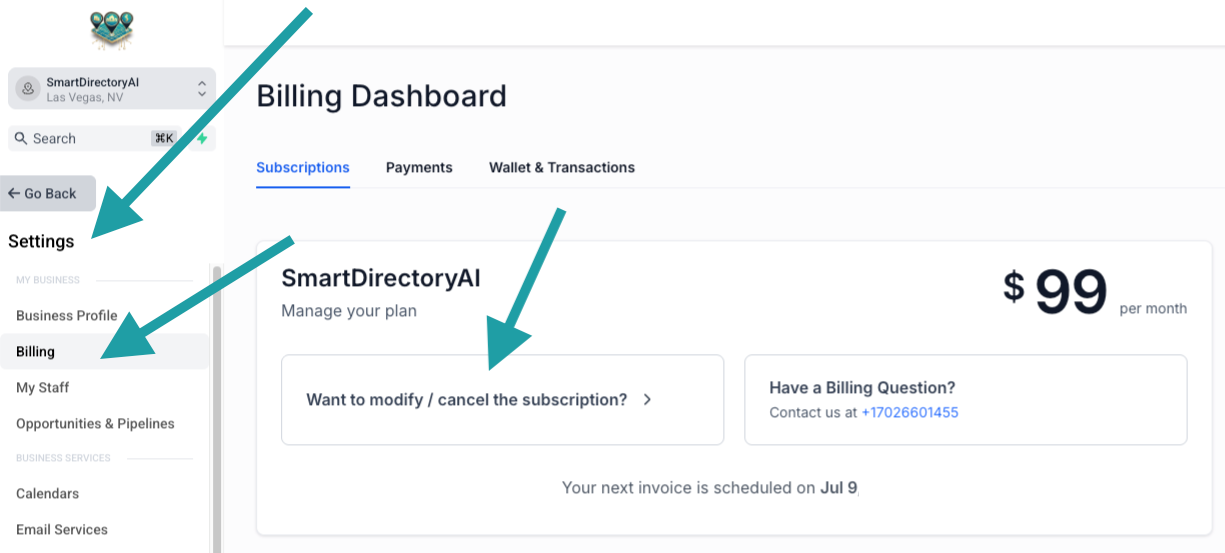
Click Settings in the left-hand menu.
Select Billing.
Under your active subscription, click Want to modify / cancel the subscription?
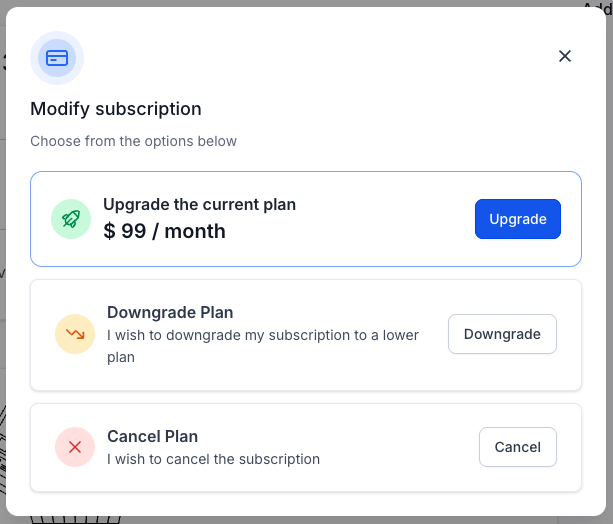
This will open the subscription management window.
Upgrading Your Plan
Select Upgrade the Current Plan to move to a higher subscription tier.
When you upgrade:
Your account is upgraded immediately. Any prorated charges are calculated automatically. Your new plan's features become available right away.
Downgrading Your Plan
Select Downgrade Plan to switch to a lower subscription tier.
When you downgrade:
Your current plan remains active until the end of your billing period. Your subscription will automatically change to the new plan on your next renewal date. You'll continue to have access to your current plan's features until the downgrade takes effect.
Cancelling Your Subscription
Select Cancel Plan if you'd like to end your subscription.
When you cancel:
Your subscription remains active until the end of your current billing period. You will not be charged again unless you reactivate your subscription. Once your billing period ends, access to SmartDirectoryAI will be removed.
Note: Cancelling your subscription does not generate a refund for previous payments. SmartDirectoryAI subscriptions are non-refundable.
Need Help?
If you have questions about your subscription or experience any issues upgrading, downgrading, or cancelling, our support team is happy to help. Submit a support ticket through the SmartDirectoryAI Help Center, and we'll assist you as quickly as possible.